
One AudioMultiCut user described the use case clearly: “This tool will be suitable for creators of sound libraries for Kontakt libraries or others. With a huge number of samples, this is a significant time optimization.”
That is exactly the kind of job where cutting software should disappear into the workflow. If you are building a playable instrument, the interesting work is choosing the source material, recording it cleanly, naming it consistently, mapping it into the sampler, and listening for musical problems.
Kontakt is the obvious reference point, but it is only one part of the current sample-library world. The same preparation step matters when you are building instruments for Steinberg HALion, UVI Falcon, Decent Sampler, Logic Sampler and older EXS libraries, Ableton Sampler or Simpler, SFZ-based tools such as sforzando, ARIA, and LinuxSampler, TX16Wx, TAL-Sampler, FL Studio DirectWave, Akai MPC keygroup programs, Renoise Redux, Serato Sample, Waves CR8, or a custom in-house engine.
Two useful cutting modes for sample-library work
| Job | Use auto-cut samples when... | Use chunk cutting when... |
|---|---|---|
| Chromatic note capture | Each note has a clear attack, decay, and quiet gap before the next note. | The recording was made from a fixed script and every note should occupy the same interval. |
| Round robin pass | The repeated takes are separated by short but detectable gaps. | You know you need exactly 4, 6, or 8 takes per note and want equal source pieces first. |
| Drum and percussion one-shots | Hits have clear transients and the tails do not overlap. | You recorded a grid-like performance and want a fixed number of pads or cells. |
| Field recordings and ambiences | There are obvious takes with silence or handling gaps between them. | You want 30-second, 1-minute, or 5-minute pieces for cataloging and later editing. |
Auto-cut and chunk cutting are preparation tools. Final instrument mapping, root-key assignment, velocity layers, round robins, looping, and scripting still happen in the sampler or library-building tool.
Clean source files come before mapping
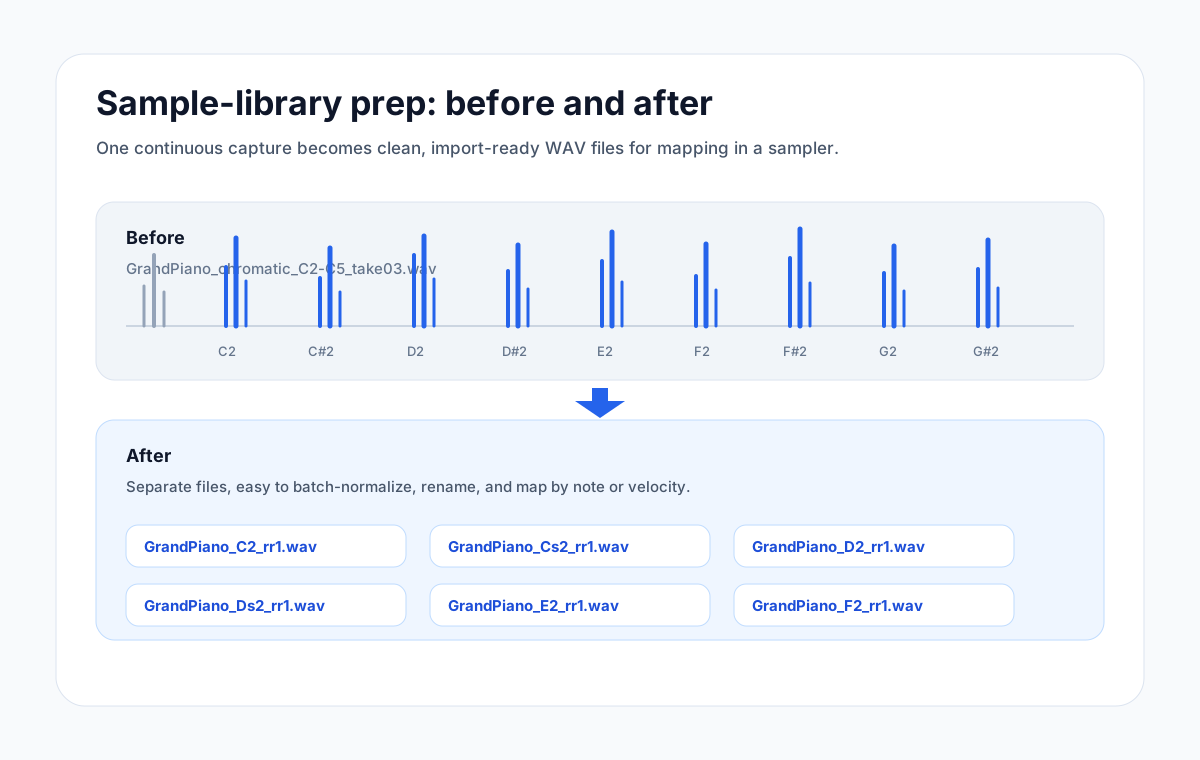
Kontakt, HALion, Falcon, Decent Sampler, and SFZ tools can all become deep very quickly, but before any mapping happens you still need clean audio files. A single source recording called `piano_notes_take_03.wav` is useful for recording. It is not useful as a mapped instrument until it becomes separate files such as `piano_C2_rr1.wav`, `piano_Cs2_rr1.wav`, and `piano_D2_rr1.wav`.
The painful part is scale. Ten samples can be cut manually. Two hundred samples can also be cut manually, but it turns into clerical work. At that point every repeated action matters: finding the boundary, zooming in, cutting, exporting, naming, checking the tail, and moving to the next sound.
Example: cutting a chromatic synth capture
Imagine recording a hardware synth across three octaves. You play C2, wait half a second, play C#2, wait again, and continue up the keyboard. If each note has a clean attack and a small gap before the next note, AudioMultiCut's Samples preset can create the first pass of clips automatically.
Before cutting, the file might be `Juno_Brass_chromatic_C2-C5.wav`: one long waveform with dozens of notes inside it. After cutting, the working folder can become `Juno_Brass_C2.wav`, `Juno_Brass_Cs2.wav`, `Juno_Brass_D2.wav`, and so on. Those names are much easier to batch rename, normalize, tune, and map into Logic Sampler, Ableton Sampler, HALion, Falcon, or an SFZ editor.
Sampler platforms beyond Kontakt
For commercial Kontakt work, the goal is usually a structured folder of WAV files that can be mapped into groups, zones, velocity layers, and round robins. HALion and UVI Falcon have their own deeper authoring environments, but they benefit from the same clean source-file discipline. Decent Sampler is friendlier for independent releases because the player is free and the format is approachable, but the library still starts with well-cut audio.
Logic Sampler and older EXS instruments are common inside Logic-based studios. Ableton Sampler and Simpler are common for producers making personal multisamples inside Live. SFZ remains useful because it is text-based and portable across tools such as sforzando, ARIA, LinuxSampler, TAL-Sampler, TX16Wx, and other compatible players. FL Studio DirectWave and Akai MPC keygroups are practical when the final instrument lives in a production environment rather than a third-party library shop. Renoise Redux, Serato Sample, and Waves CR8 sit closer to creative sampling and chopping, but clean source cuts still make those workflows faster too.
The point is not that AudioMultiCut replaces any of those instruments. It prepares the raw material so the actual sampler work starts from organized files instead of one oversized recording.
Fixed-grid recordings and equal chunks
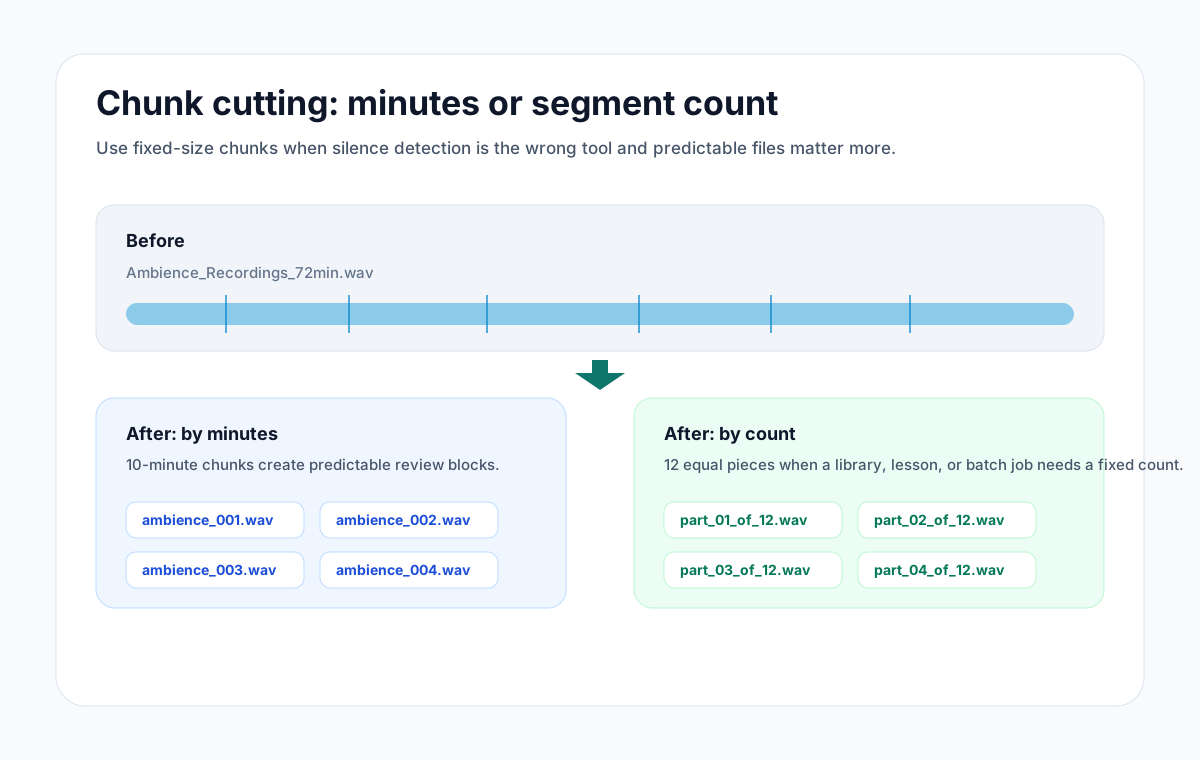
Auto-cut is strongest when the audio contains real gaps. Chunk cutting is better when the source is regular by design. If you recorded 24 ambience passes in one 24-minute file and each pass should be exactly one minute, splitting by time is cleaner than asking a silence detector to guess. If you bounced a long resampling pass and need exactly 128 slices for a downstream tool, splitting by count is the clearer instruction.
That is why AudioMultiCut now supports both styles: auto-cut for sample chains with audible gaps, and equal chunks by minutes, seconds, milliseconds, or total segment count when the destination expects a fixed structure.
Recommended prep workflow
Start by recording with the split in mind. Leave consistent space between notes or hits, avoid overlapping release tails unless overlap is intentional, and speak or write down the take structure before you start. For example: three velocity layers, four round robins, C2 through C5.
Next, upload the source file and run the Samples preset. Review the detected clips, especially the first transient and the end of the decay. If the recording is grid-based instead of silence-based, use equal chunk cutting by duration or count. Export the files, then do the sampler-specific work: naming, tuning, normalization, loop points, root keys, velocity ranges, round robin groups, release triggers, and scripting.
This approach keeps AudioMultiCut in the right role. It saves time on the repetitive cutting pass, then gets out of the way so you can do the musical and technical work inside Kontakt, HALion, Falcon, Decent Sampler, SFZ, MPC, Ableton, Logic, or whatever environment the library is actually for.
- Use short, predictable gaps for auto-cut sample detection
- Use chunk cutting when the desired output is mechanically regular
- Check starts and tails before exporting a large batch
- Keep file names sortable before importing into the sampler
FAQ
Can AudioMultiCut build a Kontakt or Decent Sampler instrument for me?
No. AudioMultiCut prepares the audio clips. Mapping, scripting, root keys, velocity layers, round robins, and packaging still happen in Kontakt, Decent Sampler, HALion, Falcon, SFZ tooling, or another sampler environment.
Should I use auto-cut or equal chunk cutting for sample libraries?
Use auto-cut when each sound has a clear gap before the next one. Use equal chunk cutting when the recording was made to a fixed grid or when you need an exact number of files.
What file format should I export?
WAV is usually the safest working format for sample-library preparation because it preserves quality for later editing, looping, tuning, and mapping.
Sources
Sampler ecosystem references were checked against official product or documentation pages on April 27, 2026.
More sample prep guides
Choose chunk lengths that balance accuracy, speed, and review effort
Best Audio Chunk Sizes for Transcription (Whisper, Google, AWS)
How to choose practical segment lengths before transcription so uploads are easier, retries are smaller, and timestamp review stays manageable.
Turn one rehearsal file into useful song files without the usual cleanup pain
How to Split Band Rehearsal Recordings Into Individual Songs
A practical workflow for taking one long rehearsal recording and turning it into clean song files your band can actually review and share.
Three common audio jobs, one browser tab
Everyday Audio Editing: Splitting Albums, Trimming Tracks, and Making Ringtones in One Tool
A practical walkthrough of three things most people eventually need to do with audio files and how to handle all of them without installing anything.
Related pages and tools
Cut a sample chain before you map it
Upload one source recording, run the Samples preset or equal chunk cutting, then export individual files for your sampler workflow.