
Meeting Recordings
Turn long meeting recordings into clips people will actually revisit
Split standups, client calls, interviews, trainings, and leadership reviews into focused audio clips for follow-ups, action items, and research review.
Upload audio
Upload a meeting recording and start clipping
Drop the meeting audio here and continue in the full cutter to isolate decisions, quotes, requirements, and action-item clips.
Why Teams Cut Meetings
The recording is not the asset. The reusable moments are.
Most teams already record meetings. The real bottleneck is getting back to the useful section quickly enough that the recording still helps.
Share the exact moment
Send the two-minute decision or requirement clip instead of asking someone to scrub through the whole recording.
Preserve nuance
Short audio clips keep tone, hesitation, and exact wording in a way that summaries alone often flatten.
Keep private calls local
Internal meetings, research calls, and client conversations can stay on the device because processing happens in the browser.
Meeting Types
Different meetings create different kinds of clips
The best clips usually map to the way the meeting was already structured: agenda items, decisions, customer needs, training modules, or action-item recaps.
Daily standups
What to clip
Blockers, owner handoffs, timeline changes, and quick recaps for teammates who missed the call.
Why it helps
People hear the relevant 60-90 seconds instead of replaying a 20-minute sync.
Client and discovery calls
What to clip
Requirements, objections, pricing discussion, implementation details, and agreed next steps.
Why it helps
Sales, product, and delivery teams can work from the exact conversation rather than a fuzzy retelling.
User interviews and research calls
What to clip
Strong quotes, pain points, feature requests, and repeated patterns by topic.
Why it helps
Research clips become much easier to tag, replay, and bring into synthesis decks or docs.
Training and onboarding sessions
What to clip
Modules, demos, Q&A moments, and process walk-throughs that should stand alone.
Why it helps
New teammates can jump directly to the useful section instead of rewatching the whole session.
Leadership, board, and planning reviews
What to clip
Decisions, risks, budget changes, staffing updates, and action-item wrap-ups.
Why it helps
The record stays clear when key moments are isolated instead of buried in an hour-long archive.
1:1s, coaching, and feedback sessions
What to clip
Commitments, practice notes, feedback moments, and next-step agreements.
Why it helps
You keep the exact phrasing and tone without forwarding unrelated private discussion.
Workflow
A fast workflow for spoken recordings
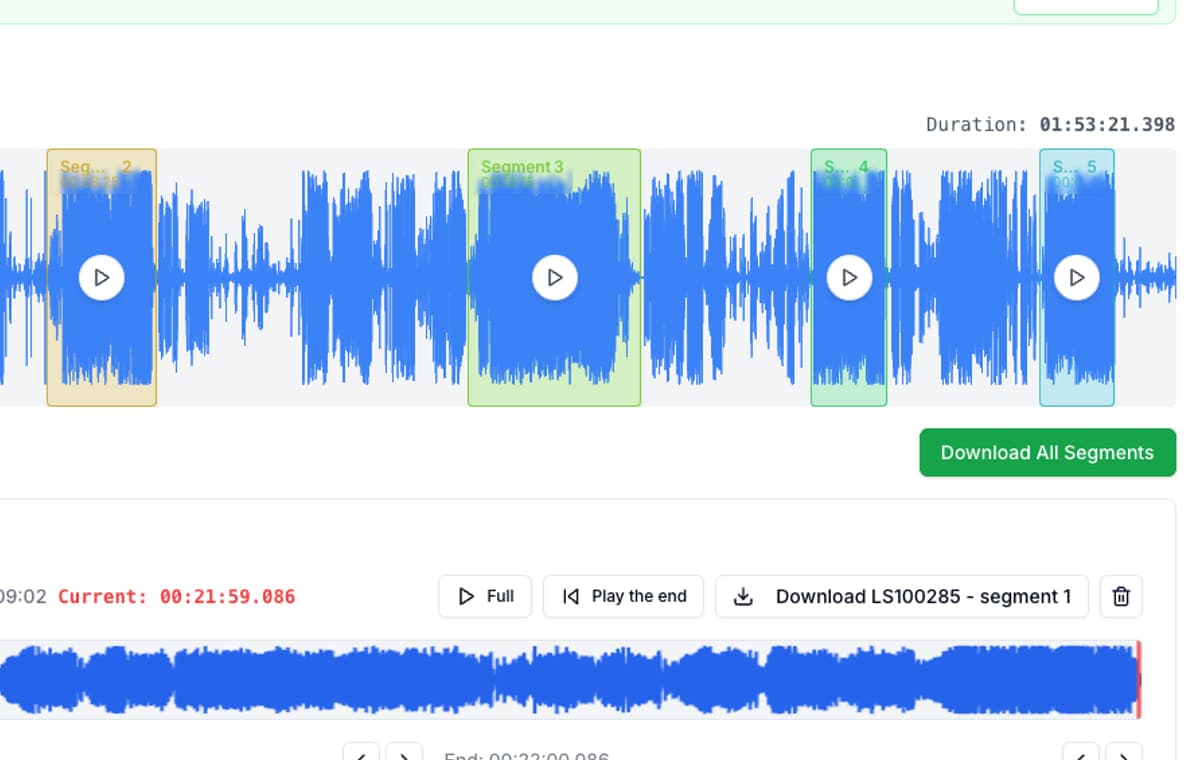
Meeting audio needs speed more than production complexity. The value is getting from one long recording to a clean set of useful clips before the team loses the thread.
Upload the full recording once
Drop in the standup, client call, interview, or planning review exactly as it was recorded. No project setup, no DAW mindset.
Split by agenda topic
Create clips around decisions, blockers, requirements, demos, Q&A sections, and action items. Long spoken recordings almost always have natural blocks already.
Trim the spoken edges fast
Preview boundary changes right away so the owner name, decision, or final sentence stays intact while the dead air disappears.
Export only what people need
Send the exact audio clip into chat, docs, or follow-up notes instead of pushing everyone toward one long archive file.
Privacy
Meeting recordings are often sensitive. The cutting workflow should respect that.
Internal planning, user research, leadership updates, and client calls are often not recordings people want routed through extra services when the actual job is just trimming the relevant sections. AudioMultiCut keeps that workflow local to the browser.
One recording in
Bring in the long meeting file exactly as it was recorded.
Local processing
Decoding, trimming, and exporting happen in the browser workflow.
Cleaner follow-up
Share only the decision, requirement, or training clip people need.
Better than “minute 43”
Exact audio clips are easier to revisit than vague timestamps in a long file.
FAQ
Common questions about cutting meeting recordings
What kinds of meeting recordings are a good fit?
Standups, client calls, discovery sessions, user interviews, trainings, onboarding sessions, leadership reviews, postmortems, and any recording where one long file really contains several distinct topics.
Why cut meeting audio if we already write notes?
Because a short audio clip preserves exact wording, tone, and context. The clip supports the written notes and removes ambiguity around what was actually said.
Should meeting clips be MP3 or WAV?
Use MP3 for sharing and quick follow-up. Use WAV only if the clip is heading into further editing or a production workflow.
Is this reasonable for internal or confidential calls?
Yes. AudioMultiCut processes recordings locally in the browser, so the file does not need to be uploaded to a server just to split it into clips.
Start Now
Cut the meeting into clips while the decisions are still fresh
AudioMultiCut works well when you already have the recording and the job is simply getting the useful parts out fast: decisions, requirements, quotes, blockers, demos, or wrap-ups.