
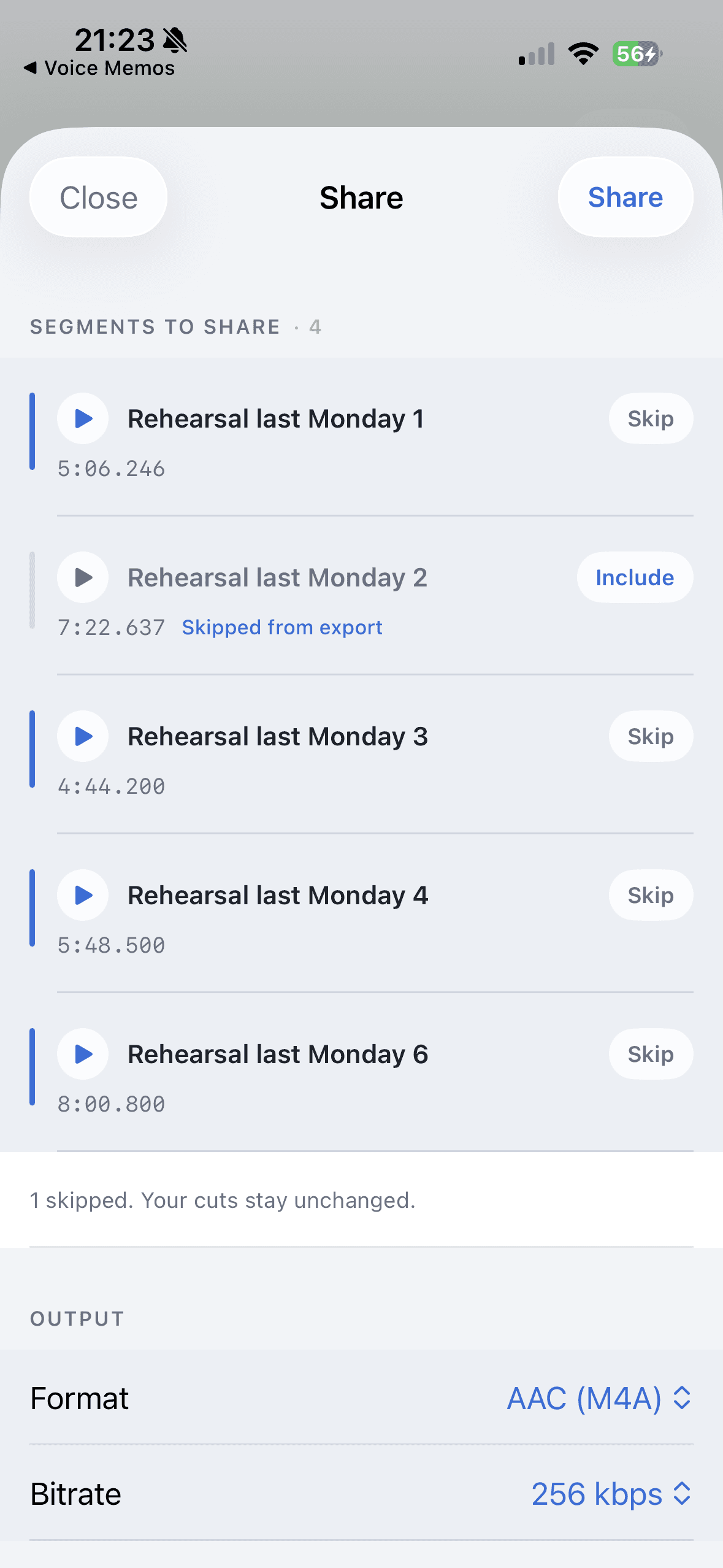
Use MP3 for a sharing copy when you do not know what the recipient will play it on. Use AAC M4A for a compact copy when the receiving app supports it. Use WAV for an editing handoff, and FLAC or Apple Lossless for a lossless copy when the destination accepts that format. Opus is worth considering when size matters and you have checked playback support.
AudioMultiCut for iPhone offers MP3, M4A, Apple Lossless, WAV, FLAC, and Opus exports with an estimated size for each segment. These are native iPhone options. Do not assume the browser editor or a direct Telegram bot job exposes the same export menu.
Pick the format for the next destination
| Export | Good starting use | Tradeoff to check |
|---|---|---|
| MP3 | A listening copy for a mixed group of recipients | Lossy; choose a suitable quality setting |
| M4A with AAC | Compact playback in apps that accept AAC | M4A names a container; check which codec it contains |
| WAV | A handoff to another audio editor | Uncompressed PCM can be much larger |
| FLAC | Lossless storage or a supported editing handoff | Confirm the receiving app can open it |
| Apple Lossless | A lossless copy for compatible Apple workflows | Different from AAC even when both use an M4A container |
| Opus | Compact speech or music for a compatible destination | Native iPhone export uses a CAF container; test the recipient's app |
Check the exported clip's size before sending
In the iPhone export workflow, change the format or quality and look at the segment's size estimate. A short sharing copy can be more useful than a lossless file that the recipient cannot conveniently download. The estimate is guidance; inspect the finished file when an upload limit is strict.
For a concrete calculation, five minutes at a constant 128 kilobits per second is about 4.8 MB of audio data: 300 seconds times 128,000 bits, divided by eight. Five minutes of stereo 44.1 kHz, 16-bit PCM is about 52.9 MB before container overhead. Those are arithmetic examples with explicit settings, not measured AudioMultiCut exports or a quality ranking.
M4A is a container, not a quality guarantee
An M4A file can contain AAC, which is lossy, or Apple Lossless, which preserves the decoded source without further lossy compression. The extension alone does not tell you whether the audio is lossless. Read the chosen export format, then check that the destination accepts it.
Converting an already compressed recording to FLAC, WAV, or Apple Lossless does not restore detail discarded earlier. A lossless export can avoid another lossy generation, but it cannot repair the source. Keep the original recording as well as the clips you share.
For Telegram, distinguish manual export from automatic delivery
If you export clips yourself, choose the format and share the files through the iPhone share sheet. MP3 is a practical starting point for a mixed band chat. Test one attachment on the receiving device before exporting a long set in an unfamiliar format. In this iPhone app, Opus is exported in a CAF container, so do not assume that an app accepting OGG/Opus will also accept this file.
Automatic rehearsal delivery uses its own prepared M4A upload path and currently accepts up to 19 MiB per completed song. Direct Telegram splitting has its own commands and output path. Neither should be described as a remote control for every format in the iPhone export menu.
Export from the saved project when the destination changes
Make a listening copy for the band and an editing copy for the person finishing the track. Give both useful names and include a take number when it matters. Sharing a smaller copy does not require deleting your local source or rebuilding the cut points.
The iPhone app shows its current free export limit and available purchase terms. Recording, editing, and listening are separate from long-project export access; optional cloud AI has its own access rules. Check the app's current screen rather than relying on an old article's price or duration limit.
FAQ
Does a WAV export make an MP3 source sound lossless?
No. It preserves the decoded audio without another lossy encoding step, but cannot recover information already lost in the MP3 source.
Are M4A and Apple Lossless the same thing?
No. M4A is a container extension. It can hold AAC or Apple Lossless, so the selected codec matters.
Does the Telegram bot offer all six iPhone export formats?
No. The bot is a separate quick-splitting workflow. Use the native iPhone export menu when you want to choose among those formats.
Sources
Native format availability and size estimates verified against the app's export implementation and App Store description on October 16, 2026. Size examples are calculations, not measured outputs. FLAC and Opus descriptions checked against their official project sites.
More audio guides
Technical guide to iPhone recordings, codecs, and export time
M4A vs MP3 for iPhone Voice Memos: What You’re Actually Recording
A technical guide to iPhone Voice Memos: what the .m4a file really is, what Apple’s built-in microphones are actually doing, and why exporting to MP3 takes real CPU time.
Record on one iPhone and deliver completed songs to the band chat
Automatically Share iPhone Rehearsal Songs to Telegram
Connect AudioMultiCut on iPhone to a Telegram group, enable completed-song sharing, and understand Wi-Fi queues, delays, and privacy.
Choose boundaries by quiet gaps or by a fixed count
Telegram Audio Bot: Smart Split or Equal Chunks?
Choose the right AudioMultiCut bot command for voice notes, songs, or equal parts. Includes group replies, examples, limits, and privacy details.
Related pages and tools
Choose the format after you choose the clips
Keep the project, compare the estimated sizes, and export for the app that will receive the audio.