
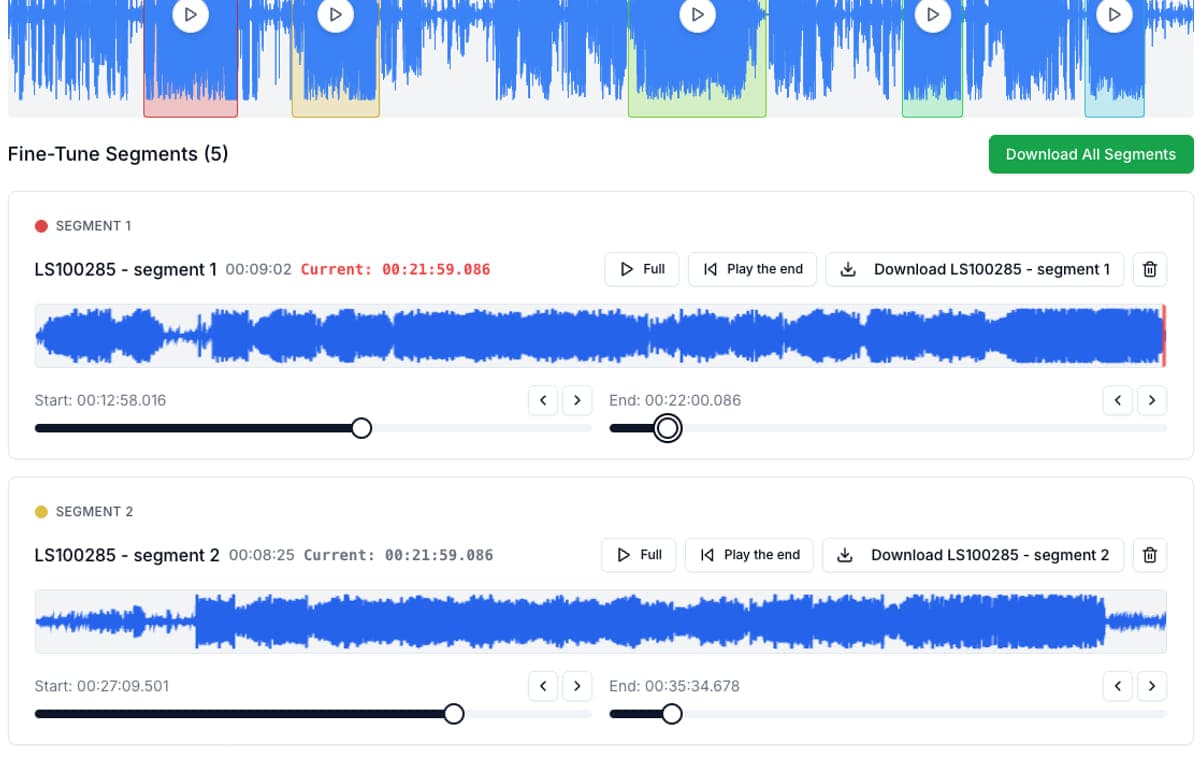
To split audio into sentences for shadowing, cut the recording at the pauses between sentences and export each sentence as its own short file. In AudioMultiCut, Auto-Cut finds the pauses for you, you fix any cut that lands mid-word, and all the sentence clips export together.
Short clips make shadowing and repetition easier: you can loop one sentence until you can say it at the same speed, and you can attach one clip to one flashcard instead of scrubbing through a long file.
Which material splits cleanly
| Material | How well pauses work | Tip |
|---|---|---|
| Textbook dialogues and graded audio | Very well, speakers pause between lines | Auto-Cut usually gets most cuts right on the first pass. |
| Audiobooks read slowly | Well | Sentences often end with a clear breath. Remove cuts that leave clips of only a few words. |
| Podcasts for learners | Mostly well | Hosts sometimes talk over each other. Check those spots by ear. |
| Native-speed podcasts and TV audio | Patchy | Background music hides pauses. Split into equal chunks of a few seconds, or mark the sentences by hand. |
Steps: cut a recording into sentence clips
Everything runs in the browser. The audio is decoded locally and is not uploaded to AudioMultiCut servers.
- Open audiomulticut.com and load the audio file (MP3, M4A and WAV all work).
- Run Auto-Cut with the Lesson Clips or Smart preset. It places a cut at each clear pause.
- Play through the clips. Where a cut lands inside a word, drag the edge to the nearest pause.
- Delete clips you do not need, such as music intros or long silences.
- Name clips in order so they sort correctly, for example lesson04_01, lesson04_02.
- Export as MP3 to keep the files small, and download all clips at once.
Using the clips for shadowing and flashcards
For shadowing, put the clips in a playlist in any music player and set it to repeat one track. Listen once, then speak along with the clip until your timing matches.
For Anki, copy the clips into Anki's media folder and reference each one on a card with [sound:lesson04_01.mp3], or drag the file into the card editor. One sentence per card keeps reviews short.
Other ways to do it
Audacity can split at pauses with Analyze > Label Sounds and then export each label as a file. It is free and offline, but slower to adjust when you have a hundred short sentences.
Some language apps cut sentences for you inside their own player. That is convenient, but the clips usually stay inside the app. Cutting the files yourself lets you use them in any player or flashcard app.
FAQ
How do I split audio into sentences automatically?
Use a tool that cuts at pauses. In AudioMultiCut, run Auto-Cut with the Lesson Clips or Smart preset, then fix any cut that lands inside a word before you export.
What clip length works best for shadowing?
One sentence, usually 2 to 8 seconds. Long clips are hard to repeat in one breath, so split long sentences at a natural pause.
Can I use the clips in Anki?
Yes. Export MP3 clips, add them to Anki's media folder and reference each file on a card with the [sound:filename.mp3] tag, or drag the file into the card editor.
Does it work with audio that has background music?
Less well, because music fills the pauses. Split into equal chunks of a few seconds or mark the sentences by hand on the waveform.
Sources
Anki and Audacity documentation checked on October 1, 2026.
More recording workflows
Get a clean first pass from Auto-Cut, then polish the edges before exporting
How Auto-Cut Works in AudioMultiCut and How to Get Clean Results
A practical guide to the Auto-Cut beta in AudioMultiCut: which preset to pick, how the silence-based detection actually decides where to split, and the final touches to do before you export.
Make practice clips people will actually come back to
How to Cut Private Lesson Recordings Into Practice Clips
A practical guide for turning one private lesson recording into short clips that are easier to replay during practice.
The simplest split jobs should be the fastest
How to Split an Audio File Into Two Parts, or Any Number of Equal Parts
Split audio in half, into thirds, or into exact timed chunks in your browser. No server upload, ads, account, or watermark.
Related pages and tools
Cut your listening audio into sentences
Load a dialogue or podcast, let Auto-Cut find the pauses, fix any cut that lands mid-word and export all sentence clips at once.