
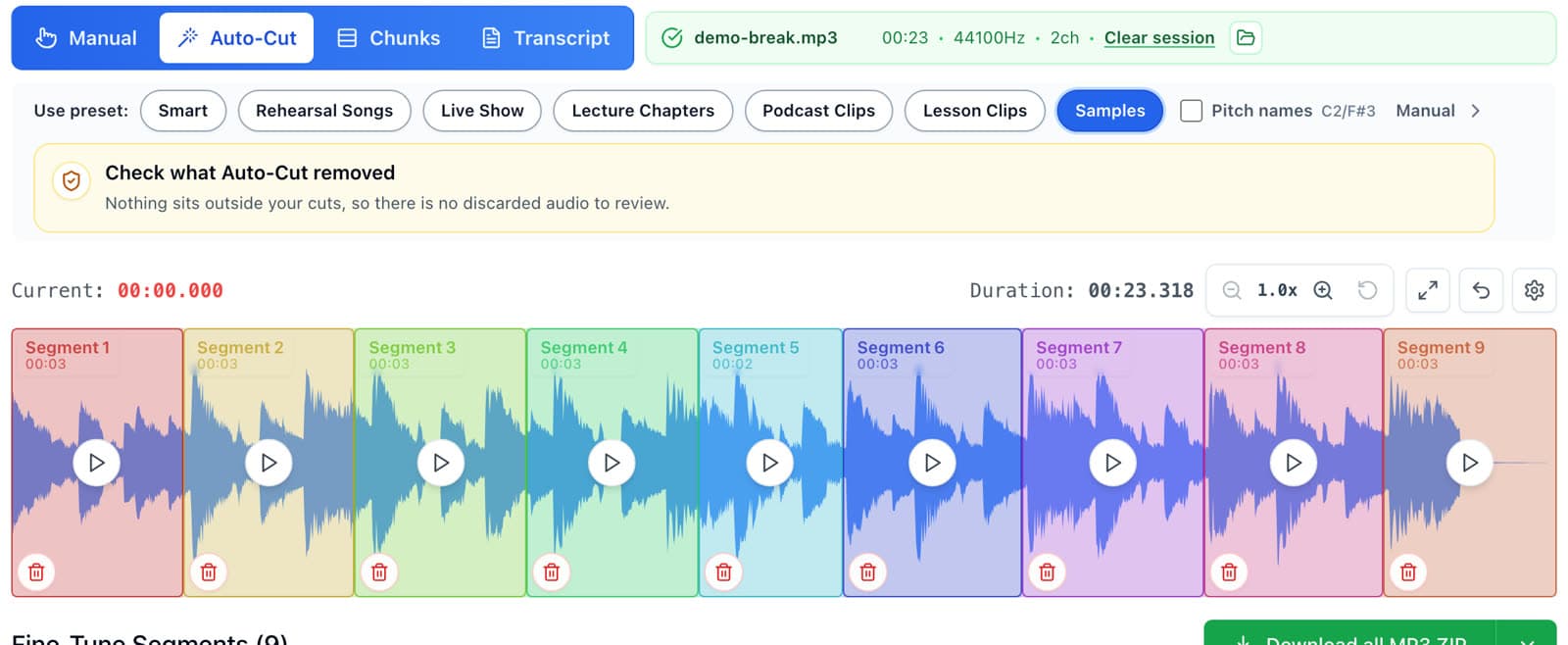
To auto-chop a long sample, drop it into AudioMultiCut, open Auto-Cut, and pick a preset. Smart works on continuous music like a full record or a long jam. Samples works on sample chains, where separate hits or notes are spaced out with short gaps. Auto-Cut marks every chop on the waveform in a few seconds, and you audition them and delete the ones you don't want.
The video below starts at 3:28 of the Verysickbeats walkthrough. An 11-minute sample goes in, the Samples preset reports too many tiny cuts, and the Smart preset turns it into 27 chops. He keeps seven and loads them into his SP-404 MKII.
When auto-chopping beats chopping by hand
Dragging chops by hand is quick for a three-minute loop. For an 8-minute ambient record, a 20-minute live jam, or a sample-pack demo track with 40 sounds in a row, scrolling the waveform to find every start point takes longer than making the beat. Auto-Cut gives you a first pass of chops, so your time goes into listening and picking.
Smart vs Samples: which preset to pick
Smart reads the shape of the recording and chooses its own settings. Use it on anything continuous, where sections change but the music rarely stops completely: full songs, records, long jams, drum loops.
Samples looks for short gaps between short sounds. Use it on sample chains: one-shots recorded back to back, a synth played note by note, drum hits with a pause between each, or a sample pack preview. It splits on gaps as short as a quarter of a second and keeps chops as short as 0.6 seconds.
If you pick Samples on continuous music, AudioMultiCut tells you it found too many tiny cuts and that the file probably is not a sample chain. That is your cue to switch to Smart.
- Full song or record rip: Smart
- Long jam session or live set: Smart
- One-shots or drum hits with gaps: Samples
- Synth or keys sampled note by note: Samples
- Drum loop you want in even slices: equal chunks
Audition, keep, and delete
After Auto-Cut runs, every chop shows up as a card with its own mini waveform. Play each one, and delete the ones that don't spark anything. In the video, 27 chops become seven in about a minute of listening.
Each chop can still be fine-tuned after auto-chopping. Pull the start in to the transient, or push the end out to catch a reverb tail.
Slice loops into equal chops
For a drum loop or a melodic loop where you want every beat or every bar on its own pad, split the audio into equal chunks by count or by length instead. Set the number of slices to match the beats in the loop, and each chop lands on the grid.
Download and load the chops
Download the chops you kept as WAV, all together in one ZIP, and drag them into your sampler or DAW. The SP-404, MPC, and DAW guide walks through each one.
FAQ
Can AudioMultiCut chop a sample automatically?
Yes. Auto-Cut finds chop points for you. The Smart preset handles continuous music and the Samples preset handles sample chains with short gaps between sounds.
Why did the Samples preset say it found too many tiny cuts?
The file is probably continuous music rather than a chain of separate sounds. Switch to the Smart preset, or split into equal chunks if you want even slices.
How long can the sample be?
The web editor opens long recordings, including 10-minute, 30-minute, and hour-long files, as long as your browser has enough memory to decode them. The iPhone app is free for recordings up to 10 minutes; AudioMultiCut Unlimited unlocks longer recordings.
Does auto-chopping upload my file?
No. AudioMultiCut processes audio locally in the browser, including Auto-Cut.
More sample prep guides
Drag, fine-tune, download, drop into your sampler
How to Chop Samples Online for Free (SP-404, MPC, Any DAW)
Chop a sample into WAV or MP3 chops in your browser: drop in the file, drag chops on the waveform, fine-tune start and end points, and download every chop as a ZIP for your SP-404, MPC, or DAW.
From chopped WAVs to a full bank of pads
How to Load Sample Chops Into an SP-404 MKII, MPC, or DAW
Get your sample chops onto pads: export WAV chops from AudioMultiCut, then drag them into the SP-404 MKII editor, an MPC, Ableton Live, FL Studio, or Logic Pro. Includes the iPhone and AirDrop route.
A faster prep workflow for musicians building playable sample instruments
Preparing Sample-Library Audio for Kontakt, HALion, Falcon, Decent Sampler, and More
A practical workflow for cutting long sample-chain recordings into clean files before mapping them in Kontakt, HALion, Falcon, Decent Sampler, Logic Sampler, Ableton Sampler, SFZ tools, MPC keygroups, and other sampler ecosystems.
Related pages and tools
Auto-chop a long sample
Open the editor with Auto-Cut ready, drop in a long sample, and try the Smart preset first.