
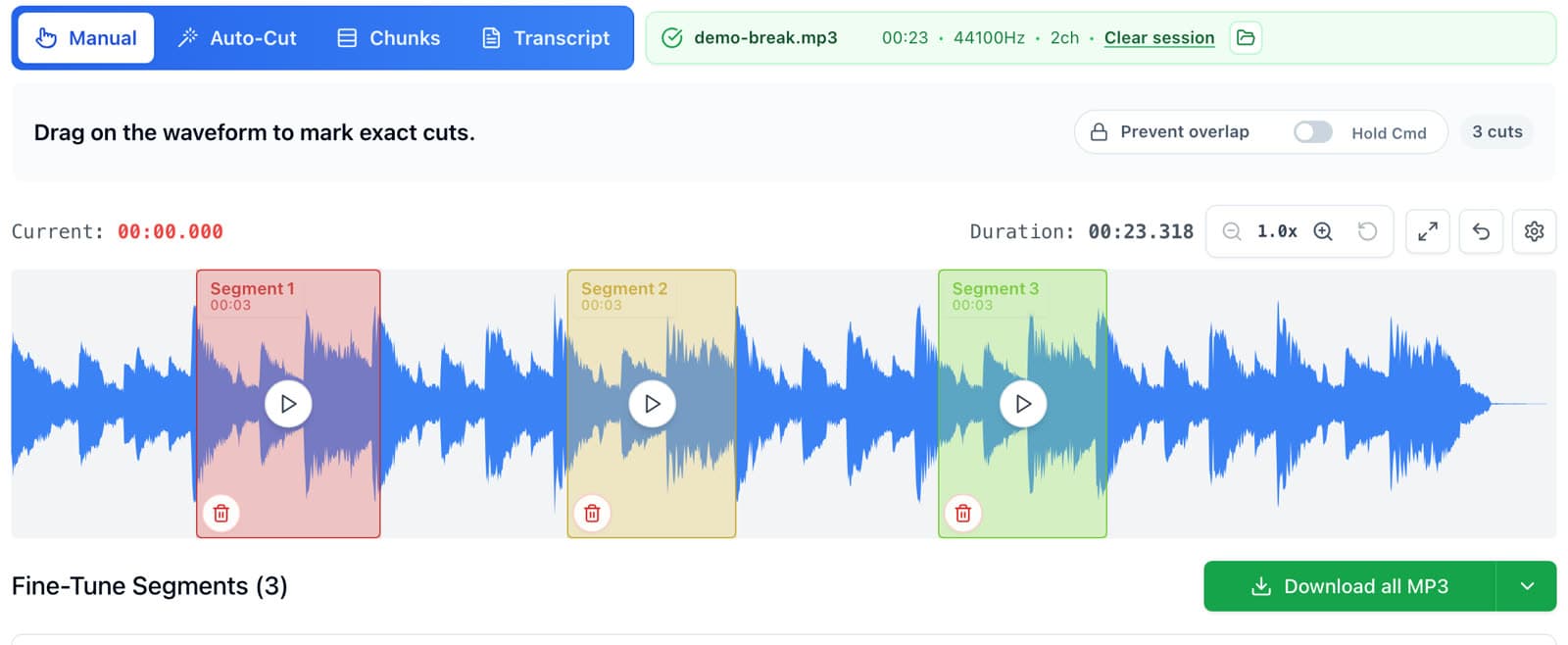
To chop samples online for free, open AudioMultiCut in your browser, drop in the sample, click and drag across the waveform for each chop, adjust the start and end points, and download the chops as WAV files. Several chops download together as one ZIP. AudioMultiCut is free, no ads, no watermark, no account, and it processes audio locally in the browser, so the record you are sampling never leaves your computer.
The video below is a walkthrough by the beatmaker Verysickbeats. He chops a sample from one of his Patreon packs into three chops, downloads them as a ZIP, and drags them into a bank on his SP-404 MKII. The steps below follow the same flow.
Step 1: Drop the sample into the editor
Go to audiomulticut.com and drag the file onto the page, or click to pick it. MP3, WAV, M4A, and other common audio formats work. The waveform appears in a second or two, because nothing is uploaded first.
If the sample is a full song or a long record rip, that is fine. Long files open the same way, and for anything over a few minutes you can let Auto-Cut find chops for you (covered in the auto-chop guide linked below).
Step 2: Drag across the waveform to make each chop
Click where the chop should start and drag to where it should end. The selection plays back so you can hear it straight away. Save it as a segment, then drag the next one. Each segment becomes one chop when you export.
Chops can overlap, sit back to back, or skip whole sections. Grab the stab, the vocal phrase, the two-bar loop, and the drum break, and ignore the rest.
- Press space to play or pause the focused chop.
- Zoom into the waveform when a chop needs to land right on a transient.
- Make the chops in the order you want them on your pads.
Step 3: Fine-tune the start and end points
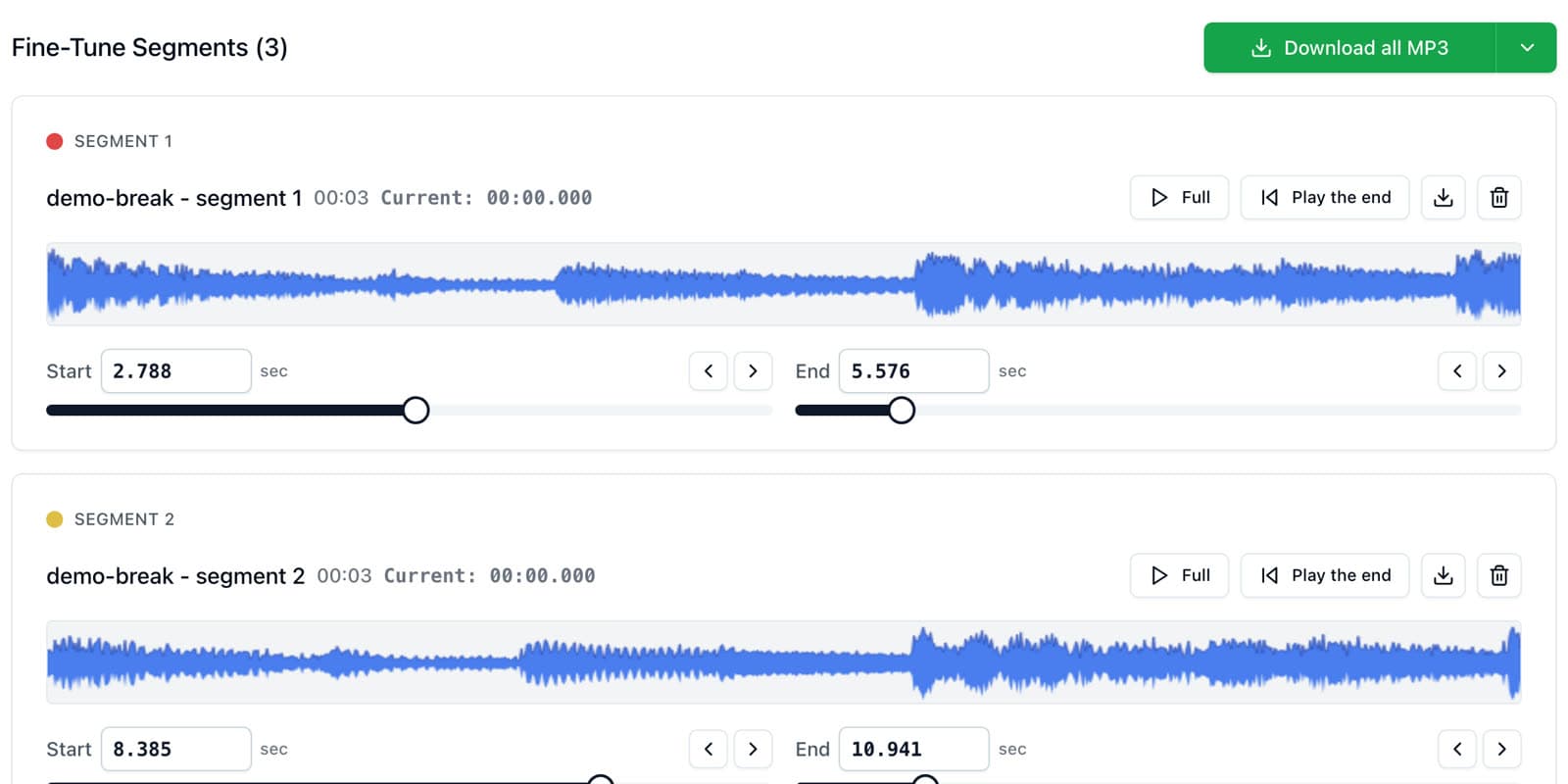
Every chop card has its own start and end controls. Nudge them until the chop starts exactly on the hit and ends before the next sound bleeds in. You hear the boundary each time you move it, which is the fastest way to catch a late start or a clipped tail.
For pads you plan to trigger as one-shots, start a few milliseconds before the transient. For loops, set the end on the next downbeat so the chop repeats in time.
Step 4: Download the chops as WAV or MP3
Pick WAV for anything going into a sampler or DAW. MP3 is smaller and fine for sharing ideas with a collaborator. Download a single chop from its card, or download all of them at once and AudioMultiCut packs them into one ZIP.
Unzip the folder to your desktop and every chop is a separate file, numbered in the order you made them.
Step 5: Load the chops into your sampler or DAW
Drag the WAV files into whatever you make beats in. In the Verysickbeats video, the chops go into the SP-404 MKII editor app and land on a bank of pads in one drag. The same files work in an MPC, Ableton Live, FL Studio, Logic Pro, Maschine, or any sampler that reads WAV.
The guide on loading chops into the SP-404 MKII, MPC, and DAWs covers each one step by step, including getting chops off your iPhone with AirDrop.
Why chop in the browser instead of in the DAW
Chopping inside a DAW means slicing, consolidating, and exporting each clip one at a time. On hardware like the SP-404, chopping on the unit is slow and the screen is tiny. AudioMultiCut gives you a big waveform, instant playback of each chop, and one download for the whole set, so the chopping is done before you open your beat project.
It also works on a laptop that has no DAW installed, which is handy when you are digging through records away from the studio.
FAQ
What is the best free tool to chop samples?
For chopping one sample into several WAV files you can load into a sampler, AudioMultiCut is free, runs in the browser, and exports every chop at once as a ZIP. If you want to chop and sequence in the same place, a DAW like Ableton Live or FL Studio, or a hardware sampler, does both but takes longer per chop.
Is AudioMultiCut free for sample chopping?
Yes. The web editor at audiomulticut.com is free, no ads, no watermark, no account. The iPhone app is free for recordings up to 10 minutes; AudioMultiCut Unlimited unlocks longer recordings.
Are my samples uploaded anywhere?
No. AudioMultiCut processes audio locally in the browser. Cutting, previewing, and exporting chops happens on your computer.
Should I export chops as WAV or MP3?
WAV for samplers and DAWs, because it keeps the full quality and every sampler reads it. MP3 is fine for sending rough ideas to someone.
Can I chop samples on my phone?
Yes, on iPhone. The AudioMultiCut iPhone app imports from Files, chops with the Smart preset or by hand, and shares the chops through AirDrop, Files, or Messages.
More sample prep guides
Let Auto-Cut find the chops, then audition and keep the good ones
How to Auto-Chop a Long Sample Into Chops in Seconds
Auto-chop an 8, 10, or 20-minute sample into dozens of chops with AudioMultiCut's Smart and Samples presets, then keep the chops you like and delete the rest.
From chopped WAVs to a full bank of pads
How to Load Sample Chops Into an SP-404 MKII, MPC, or DAW
Get your sample chops onto pads: export WAV chops from AudioMultiCut, then drag them into the SP-404 MKII editor, an MPC, Ableton Live, FL Studio, or Logic Pro. Includes the iPhone and AirDrop route.
A faster prep workflow for musicians building playable sample instruments
Preparing Sample-Library Audio for Kontakt, HALion, Falcon, Decent Sampler, and More
A practical workflow for cutting long sample-chain recordings into clean files before mapping them in Kontakt, HALion, Falcon, Decent Sampler, Logic Sampler, Ableton Sampler, SFZ tools, MPC keygroups, and other sampler ecosystems.
Related pages and tools
Chop your first sample
Drop a sample into the editor, drag a few chops on the waveform, and download them as WAV files.