
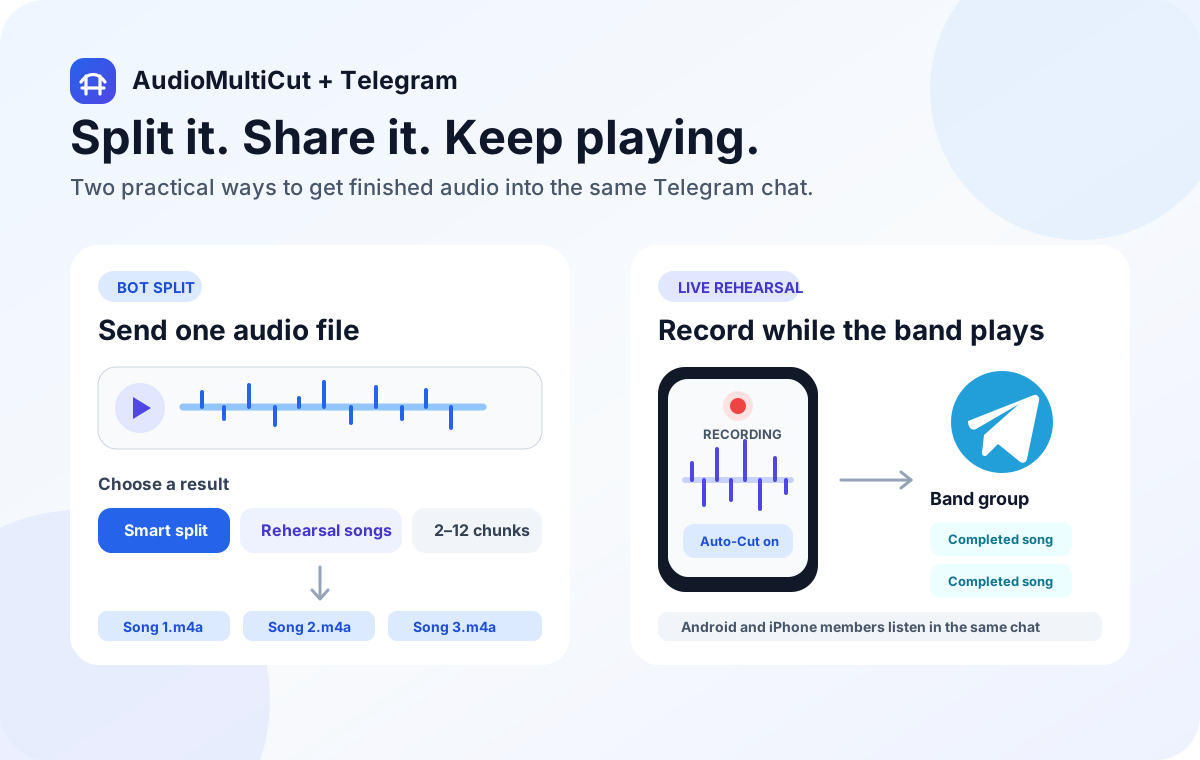
Send an audio file to @SplitWithAudioMultiCutBot, choose Smart split, Rehearsal songs, or equal chunks, and the bot returns the clips in the same Telegram chat. It does the quick split on the server, so you do not need to open the website or install the app first.
For a band, Telegram is a practical shared destination because Android and iPhone members can use the same group. AudioMultiCut for iPhone can also watch a rehearsal recording for completed songs and post them to a connected Telegram group while the rehearsal continues.
Choose the split that matches the recording
| Option | Use it for | What it does |
|---|---|---|
| Smart split | Voice notes, meetings, and mixed recordings | Looks for shorter quiet gaps and returns the useful sections between them. |
| Rehearsal songs | Band practice and live music recordings | Looks for longer pauses and avoids returning very short fragments as songs. |
| Equal chunks | Uploads, review batches, and fixed-size handoff | Divides the file into 2, 4, or 6 equal pieces from the buttons, or 2 through 12 with /chunks. |
The bot can split the file by itself
Open the bot in Telegram and send it an audio file in a private chat. Telegram shows buttons for Smart split, Rehearsal songs, and equal chunks. Tap one and wait for the returned clips. Each result includes the AudioMultiCut name plus links to the full web editor and iPhone app, so recipients can see where the file came from and continue with more precise editing when needed.
In a group, mention the bot explicitly with /split, /split rehearsal, or /chunks followed by a number. That keeps the bot from reacting to every audio message in the conversation.
Use the bot for speed and the editor for control
The direct Telegram split is a fast server-side job based on FFmpeg and quiet gaps. It is separate from the native Auto-Cut detector in the iPhone app. Smart split uses shorter gaps for general audio. Rehearsal songs waits for longer pauses and applies a longer minimum section so a count-in or short silence is less likely to become its own file.
Use the web or iPhone editor when you need to see the waveform, move an exact boundary, rename several clips, or choose export settings. The browser editor processes the source locally for its normal cutting workflow. Sending a file to the Telegram bot uploads it for server processing, because the bot cannot split a file that Telegram has not delivered to it.
Automatic rehearsal sharing from iPhone
In the App Store app, open Settings, choose Telegram Rehearsal Sharing, connect a Telegram group, and enable automatic sharing of completed songs. During a rehearsal, the app periodically analyzes sealed parts of the growing recording with its native Auto-Cut pipeline. It only queues a song after the end is safely behind the live recording position, which reduces half-song uploads.
The app keeps a private upload queue and retries when the connection returns. The final pass after recording ends checks the complete file again, including the last song. Delivery timing still depends on iOS background time and network access, so a clip may arrive later if the phone is offline or the system pauses background work.
- Bandmates receive playable audio in the Telegram group and do not need AudioMultiCut.
- The recording phone needs AudioMultiCut and the connected Telegram group.
- A Wi-Fi-only option can hold uploads until Wi-Fi is available.
- Automatic rehearsal sharing is available in the public iPhone app from version 1.0.7.
Limits of the quick Telegram splitter
The bot accepts files up to 20 MB and recordings up to 30 minutes for this quick workflow. It returns at most 12 clips and allows five split jobs per chat per hour. These limits keep one large upload from tying up the shared service.
For a long rehearsal, a large lossless file, or a cut that needs exact listening, use AudioMultiCut on the web or iPhone. The Telegram bot is best when the file already fits in a chat and a useful first pass is more valuable than detailed boundary control.
What happens to the audio
A file sent directly to the bot must pass through Telegram and AudioMultiCut's processing service. For automatic iPhone rehearsal sharing, the app exports a completed song, uploads it to private temporary storage through a short-lived URL, asks the bot to post it, and deletes the temporary copy after Telegram confirms delivery.
Telegram keeps the delivered message according to the group's own history and retention settings. Do not use the bot for material that should never leave the device. Use the browser editor for local cutting when that privacy boundary matters.
FAQ
Can the Telegram bot split audio without the website or app?
Yes. Send the file to @SplitWithAudioMultiCutBot and choose a split option. The quick split runs on AudioMultiCut's server and the bot returns the clips in Telegram.
Can it split audio into equal chunks?
Yes. Use the 2, 4, or 6 chunk buttons, or send /chunks followed by a number from 2 through 12.
Do Android bandmates need the AudioMultiCut app?
No. They can play or download the delivered clips in Telegram. Only the iPhone making an automatically shared rehearsal recording needs the AudioMultiCut app.
Does the bot use the same Auto-Cut algorithm as the iPhone app?
No. Direct bot jobs use server-side FFmpeg silence detection for a quick result. Live rehearsal sharing on iPhone uses the app's native Auto-Cut pipeline.
Will automatic sharing continue when the phone is locked?
The app keeps a persistent queue and asks iOS for background upload time, but exact timing depends on the connection and the system. Queued clips retry when the app or network can continue.
Sources
Bot commands, processing limits, branded reply links, temporary delivery flow, and the iPhone rehearsal-sharing beta were checked against the AudioMultiCut web and iOS implementations on September 18, 2026.
More recording workflows
Generous file limits do not make long audio listenable
How to Send a Long Voice Message on Telegram
Telegram handles big files better than most chat apps, but long voice messages still arrive as one unplayable block. Splitting them on your phone fixes that.
Record and split in the same iPhone app
How to Record, Split, and Share Audio on iPhone
Record in AudioMultiCut, see estimated sections appear while you record, then review the finished cuts and share the original or exported clips.
Turn one rehearsal file into useful song files without the usual cleanup pain
How to Split Band Rehearsal Recordings Into Individual Songs
A practical workflow for taking one long rehearsal recording and turning it into clean song files your band can actually review and share.
Related pages and tools
Send a file to the Telegram bot
Open @SplitWithAudioMultiCutBot, send an audio file, then choose the split that fits the recording. The finished clips return to the same chat.