
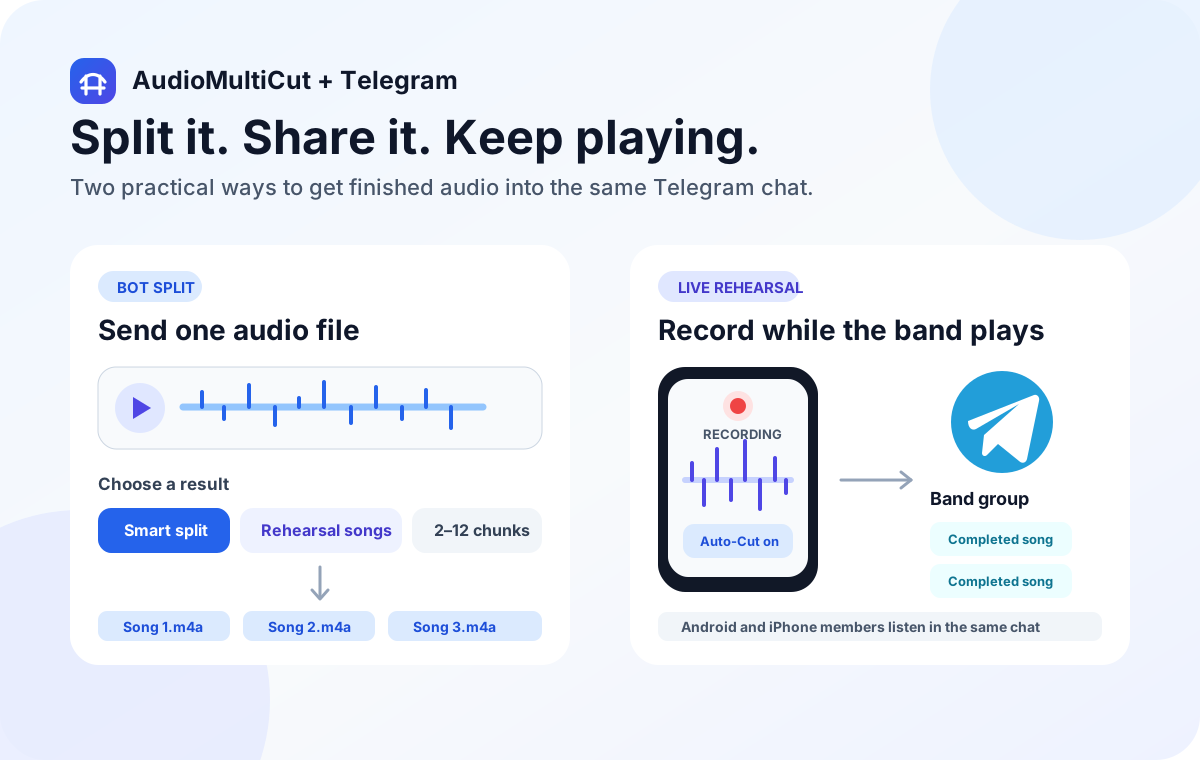
Use AudioMultiCut with Telegram when the band wants separate song files in its existing chat. Choose Samply when listening and feedback should live together, Google Drive for a shared file archive, or private SoundCloud links for a listening page. Cutting the songs and choosing where they live are two separate decisions.
Do not make every bandmate download a full rehearsal just to hear one take. Prepare named clips, choose the access settings, and test the result as a recipient. This guide compares delivery and review workflows; it is not a cloud-storage security audit.
Four ways to hand the rehearsal to the band
| Tool | Use it for | What to prepare | Watch for |
|---|---|---|---|
| AudioMultiCut + Telegram | Song files arriving in a chat | Reviewed clips or opted-in iPhone auto-sharing | Uploads, group choice, and delivery delays |
| Samply | An audio project with review controls | Tracks uploaded to a project | Invited access versus forwardable public links |
| Google Drive | A shared folder and downloadable files | A clearly named session folder | Restricted access versus anyone-with-link access |
| SoundCloud private links | A listening link for a track or playlist | Uploaded audio with private visibility | A secret link can still be forwarded |
AudioMultiCut and Telegram: put complete songs in the chat
The AudioMultiCut bot can split an existing Telegram audio message at quiet gaps or into equal chunks. Its other workflow connects AudioMultiCut for iPhone to a group and delivers completed rehearsal songs after you enable automatic sharing. Recipients can listen in Telegram without installing the recording app.
Pair the intended group from the iPhone settings before rehearsal. Network access, a Wi-Fi-only option, and iOS background time affect delivery. Sending audio through the bot or automatic sharing uploads it; that differs from normal local cutting in the browser. Preview important takes before treating them as the band's final reference.
Samply: keep the audio project and review options together
Samply's official setup guide covers projects, track uploads, ordering, and sharing. Its project options include comments, downloads, and versions, so it suits a discussion that needs more structure than attachments scattered through a long chat.
Choose access deliberately. Invited collaborators and public listening links are different arrangements. The documentation explains that a public link can be forwarded, while private projects use invited access. Check which review options you enabled instead of assuming that everyone can comment, download, or switch versions.
Google Drive: maintain a session folder
Drive fits a band that wants ordinary files in a shared archive. Google's sharing controls distinguish named access from general access, with viewer, commenter, and editor roles. Choose the least editing access the recipients need and keep each session in a recognizable folder.
A practical folder name could be 2026-10-19-rehearsal, with numbered takes inside; this is a naming example. Avoid replacing the only copy with a newer take that has the same filename. Test access from another band member's account before relying on the link during practice.
SoundCloud: send a private listening link
SoundCloud documents secret links for private tracks and playlists. That can suit a listening handoff when you want to send one link instead of separate attachments. Upload the intended audio and check its visibility before distributing the link.
Private visibility does not make the secret URL a named invitation. Anyone who receives that link may be able to pass it on. If the recording should stay with specific people, choose an access model that checks the listener's identity rather than depending only on possession of the URL.
Run a recipient check on one song
Send or share one track first. Ask whether it opens on the phone the bandmate actually uses, whether the filename identifies the take, and whether the start and ending are intact. Confirm that the person can download it if offline practice is part of the plan.
Choose one place for the agreed reference take. If you also maintain an archive, label it separately so a rough take posted during rehearsal is not mistaken for the arrangement everyone should learn next week.
FAQ
Do Android bandmates need AudioMultiCut to receive Telegram rehearsal clips?
No. Telegram recipients can listen to the delivered audio. The recording iPhone needs AudioMultiCut for the optional automatic rehearsal-sharing workflow.
Is a private SoundCloud link the same as an invited-only project?
No. A secret listening link can be forwarded. Use account-based access when you need to restrict listening to named people.
Sources
Published by AudioMultiCut, which is included in this shortlist. Selections reflect documented task fit, not a scored ranking or a hands-on speed or quality benchmark. Official sources and AudioMultiCut behavior checked October 19, 2026; check each provider's current access and export terms before committing a project.
More audio workflows
Record on one iPhone and deliver completed songs to the band chat
Automatically Share iPhone Rehearsal Songs to Telegram
Connect AudioMultiCut on iPhone to a Telegram group, enable completed-song sharing, and understand Wi-Fi queues, delays, and privacy.
Choose boundaries by quiet gaps or by a fixed count
Telegram Audio Bot: Smart Split or Equal Chunks?
Choose the right AudioMultiCut bot command for voice notes, songs, or equal parts. Includes group replies, examples, limits, and privacy details.
Turn one rehearsal file into useful song files without the usual cleanup pain
How to Split Band Rehearsal Recordings Into Individual Songs
A practical workflow for taking one long rehearsal recording and turning it into clean song files your band can actually review and share.
Related pages and tools
Prepare the songs before choosing the destination
Record or import on iPhone, review the clips, then share them manually or configure optional Telegram delivery.